A Professional's Take on the New Combo Touch
The landscape of mobile computing has shifted dramatically over the last several years. What once served as a secondary consumption device has evolved into a legitimate workstation for many professionals. Central to this transformation is the integration of high-quality peripherals that bridge the gap between the tactile experience of a laptop and the versatility of a tablet. In the electronics category, few accessories have garnered as much attention as the Logitech Combo Touch. This review provides an in-depth editorial analysis of the newest iteration of the Combo Touch, examining its engineering, daily utility, and value proposition for the modern professional.
The Evolution of the Hybrid Workstation
For the mobile workforce, the dream has always been "one device to rule them all." While iPads and other high-end tablets offer the processing power to handle demanding tasks, the software interface often requires a physical interface to achieve maximum efficiency. The Combo Touch represents the pinnacle of this hybrid approach. Unlike traditional folio cases that offer a fixed viewing angle or a cramped typing experience, the newest Combo Touch leverages a modular design that adapts to the user's environment rather than forcing the user to adapt to the hardware.
Professionals today care about three primary pillars when selecting an accessory: protection, productivity, and portability. The Combo Touch attempts to hit the "sweet spot" of all three. It provides a rugged shell that guards against the inevitable bumps of a commute, a full-sized backlit keyboard with a precision trackpad for deep work, and a detachable design that allows the keyboard to be discarded when it is time to transition into "studio mode" for sketching or reading.
Detailed Product Analysis: Design and Build Quality
The first thing a professional will notice about the new Combo Touch is the textile-like finish. Logitech has opted for a woven fabric that feels sophisticated and durable. This is a departure from the industrial plastics or faux-leathers often found in this category. The fabric is not just an aesthetic choice; it provides a better grip when carrying the device and is remarkably resistant to fingerprints and smudges, which is a common complaint with high-gloss or silicone finishes.
The Keyboard Experience
Typing feel is subjective, but there are objective metrics that define a professional-grade keyboard. The Combo Touch features well-spaced keys with a tactile scissor mechanism. The key travel is deep enough to provide meaningful feedback, preventing the "bottoming out" sensation that leads to finger fatigue during long writing sessions. Furthermore, the inclusion of a full row of shortcut keys is a significant productivity booster. Being able to adjust brightness, volume, and media playback without diving into software menus or Control Center saves cumulative minutes throughout the workday.
The backlighting is another standout feature. It’s not just "on or off"; the keys feature multiple levels of adjustable brightness. More impressively, the backlighting is smart enough to turn off when the device is idle to preserve battery and automatically illuminate the moment your fingers approach the keys. This level of refinement is what separates a premium peripheral from a budget alternative.
The Trackpad: A Desktop-Class Experience
In previous years, trackpads on tablet cases were often an afterthought—small, laggy, and physically difficult to click. The new Combo Touch features a significantly larger trackpad than its predecessors. It is fully clickable across the entire surface, meaning the user doesn’t have to hunt for a specific pressure point at the bottom of the pad. This is a "Click-Anywhere" design that supports the full array of Multi-Touch gestures professionals have come to rely on, such as three-finger swipes to switch apps or pinch-to-zoom for detailed design work.
Shop the latest Electronics picks on Amazon.
View Offers →Real-World Use Cases for Professionals
To understand the value of the Combo Touch, we must look at how it performs in various professional scenarios. The device is aimed at those who find themselves in transitioning environments—from the office to the airport lounge, or from a client presentation to a creative brainstorming session.
The Digital Nomad and Frequent Traveler
For those who work from tray tables or cramped coffee shop counters, the integrated kickstart is the hero of the design. The friction-based hinge is incredibly sturdy, allowing for a 40-degree range of motion. This allows the user to find the perfect ergonomic angle regardless of the height of the surface. Because the keyboard is powered via the Smart Connector, there is no need for Bluetooth pairing or separate charging cables. This "plug and play" simplicity is vital for professionals who cannot afford to troubleshoot connectivity issues during a time-sensitive task.
The Creative Professional
Photographers, illustrators, and editors often need to switch between high-precision typing and direct touch interaction. The detachable keyboard is perhaps the most useful feature for this demographic. One can spend the morning responding to emails and drafting project proposals in "Type Mode," then simply pull the keyboard away and fold back the kickstand into "Sketch Mode." This transition is seamless because the case itself remains on the tablet, providing protection and a stand even when the keyboard is absent.
Comparative Analysis: Finding the Right Fit
When evaluating the Combo Touch, it is helpful to see how it stacks up against the broader market of keybo…| Feature | Modular Design (Combo Touch) | Floating Cantilever Style | Slim Folio Style |
|---|---|---|---|
| Protection | Full edge-to-edge coverage and back shell. | Exposed edges; limited drop protection. | Basic scratch protection for front/back. |
| Detachable Keyboard | Yes, keyboard can be removed entirely. | No, keyboard is a permanent fixture. | Generally no, or difficult to remove. |
| Viewing Angles | Flexible (10 to 60 degrees via kickstand). | Adjustable but limited to upper angles. | Fixed (usually one or two positions). |
| Power Source | Smart Connector (No charging required). | Smart Connector. | Bluetooth (Battery required). |
| Lap Stability | Moderate (Requires kickstand footprint). | Excellent (Solid base). | Good (Lightweight). |
Pros and Cons: A Balanced View
No piece of technology is perfect, and the Combo Touch involves certain trade-offs that a buyer must consider. While it excels in versatility, its physical footprint and weight are factors to weigh against its benefits.
- Pros:
- Highly versatile 4-mode design (Type, Sketch, View, Read).
- Large, responsive trackpad with multi-gesture support.
- Full row of dedicated iPadOS shortcut keys.
- No charging or pairing required thanks to the Smart Connector.
- Excellent build quality with a premium, professional aesthetic.
- Integrated holder for an Apple Pencil or Logitech Crayon.
- Cons:
- The kickstand design requires a deeper surface area compared to a traditional laptop.
- Adds significant weight and thickness to the sleek tablet profile.
- The fabric finish, while durable, may be harder to sanitize than plastic or leather.
- The kickstand can be difficult to use on a lap in very tight spaces.
Buying Guide: Is the Combo Touch Right for You?
Choosing an electronics accessory as critical as a keyboard case requires looking at your specific workflow. Here is a guide to determining if this investment aligns with your professional needs.
Consider Your Environment
If you spend most of your time at a desk with a monitor, you might prefer a static setup. However, if your "office" changes daily, the Combo Touch is the better choice. Think about the surfaces you use. The kickstand design is brilliant on tables, desks, and podiums. If you frequently type with the device literally on your lap while sitting in a chair without a desk, you may find the kickstand slightly more cumbersome than a rigid "clamshell" design.
Find top-rated Electronics products at great prices.
See Deals →Evaluate Your Productivity Needs
Are you a writer, coder, or data scientist? If your primary output is text-based, the quality of the keys and the presence of a row of function keys are non-negotiable. The Combo Touch provides almost parity with a laptop keyboard. If you are primarily a consumer of media or an artist, the ability to detach the keyboard while maintaining the stand functionality is a feature you will use daily.
Weight and Portability
Modern tablets are remarkably light. Adding a keyboard case like the Combo Touch will nearly double the weight of the device. For most professionals, this is a worthy trade-off for the utility provided, but if your priority is "feather-light" travel, you must be prepared for the added heft. The trade-off is that you are essentially getting the protection of a rugged case and the utility of a keyboard in one package, potentially eliminating the need to carry a separate laptop.
The Technical Edge: Connectivity and Longevity
From an electronics engineering perspective, the use of the Smart Connector is the most professional-grade choice available. Bluetooth keyboards, even high-end ones, eventually suffer from signal interference or battery degradation. By drawing a tiny amount of power directly from the host device, the Combo Touch ensures that it is always ready to work. There is zero latency between a keypress and the character appearing on the screen, which is essential for high-speed typists.
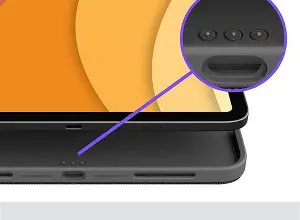
Furthermore, the case provides significant impact protection. The corners are reinforced to handle drops from heights typical of a desk or a briefcase. For a professional who travels with a device worth a thousand dollars or more, the "insurance" provided by the case's protective shell is just as valuable as the keyboard itself.
Conclusion
The Logitech Combo Touch stands as a testament to how far tablet accessories have come. It is no longer just a "protective cover with keys," but a sophisticated extension of the tablet's hardware. By focusing on high-quality tactile feedback, a desktop-class trackpad, and a modular design that respects the user's need for flexibility, Logitech has created a tool that truly enhances professional productivity. While it adds some bulk and requires a bit of desk space for the kickstand, the benefits of the Smart Connector, the premium fabric finish, and the seamless transition between work modes make it one of the most compelling options in the electronics market today. For the professional looking to maximize the utility of their tablet without sacrificing protection or comfort, the Combo Touch offers a robust, thoughtful, and highly functional solution.